Numbered algorithm steps that say “go to step 4” are hard to follow. A flowchart draws the same algorithm as a picture, so branches and loops are visible at a glance. Drawing a flowchart and writing the matching algorithm is one of the most frequently examined tasks in this unit.
What a flowchart is
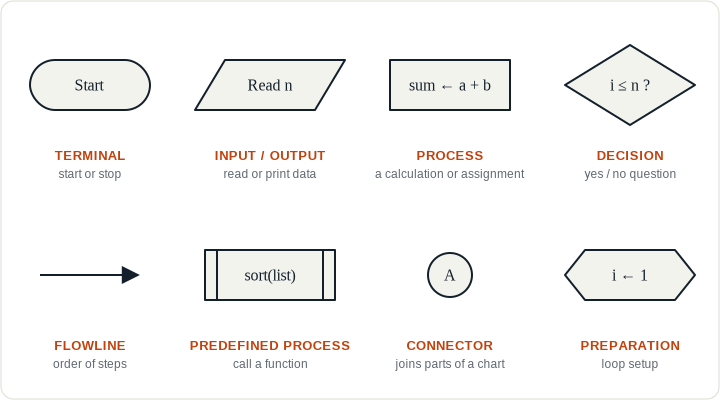
The symbols are standardised internationally (ISO 5807). The shape tells the reader what kind of step it is; the text inside says exactly what happens.
Standard symbols
Symbol
Shape
Used for
Example text
Terminal
Rounded rectangle (oval)
Start or stop
Start, Stop
Input/output
Parallelogram
Reading input or printing output
Read n, Print fact
Process
Rectangle
Calculation or assignment
sum ← a + b
Decision
Diamond
A yes/no question with two exits
i ≤ n ?
Flowline
Arrow
Order of execution
Connector
Small circle
Joins two parts of a chart
A
Predefined process
Rectangle with double side lines
Calling a function defined elsewhere
sort(list)
Preparation
Hexagon
Loop setup (optional)
i ← 1
Annotation
Open bracket with a dashed line
A comment on a step
Rules for a correct flowchart
Exactly one Start terminal and at least one Stop terminal.
Flow runs top to bottom and left to right; arrows show direction.
A decision has one entry and exactly two labelled exits (Yes/No or True/False).
Process and input/output symbols have one entry and one exit.
Flowlines should not cross; use connectors when a chart becomes large.
The three control structures
Every flowchart, and every program, can be built from three patterns.
Structure
Meaning
In a flowchart
In C (later units)
Sequence
Steps run one after another
Symbols in a straight line
Statements one after another
Selection
Choose one of two paths
A diamond whose two paths rejoin later
if, switch
Iteration
Repeat steps
A diamond plus an arrow going back to an earlier point
while, for, do-while
Choosing the starting value of a loop variable
When a loop builds up a result, the starting value must be one that does not change the result. This is the identity element of the operation:
For multiplication, start at 1, because x×1=x.
For addition, start at 0, because x+0=x.
Algorithm versus flowchart
Aspect
Algorithm
Flowchart
Form
Numbered steps in plain language or pseudocode
Diagram of standard symbols
Seeing branches and loops
Hard: you follow “go to” steps
Easy: visible at a glance
Effort to write or change
Quick
Slow to redraw
Large problems
Suitable
Becomes big and hard to follow
Closeness to code
Close, especially pseudocode
Further from code
Both represent the same algorithm. In an exam, the algorithm and the flowchart you give for a problem must describe exactly the same steps.
Key takeaways
A flowchart is a picture of an algorithm using standard symbols.
Sequence, selection and iteration are enough to express any algorithm.
A loop appears as a decision with an arrow back to an earlier point.
Start sums at 0 and products at 1.
Practice questions
Answer on paper first, then check. The explanation matters more than the letter you chose.
Question 7 · short answer
Write an algorithm to find the sum of the first n natural numbers, and list the flowchart symbols in order with the text inside each.
Show worked answer
Algorithm: 1. Start. 2. Read n. 3. i ← 1, sum ← 0. 4. While i ≤ n, repeat steps 5 and 6. 5. sum ← sum + i. 6. i ← i + 1. 7. Print sum. 8. Stop. Flowchart: oval “Start” → parallelogram “Read n” → rectangle “i ← 1, sum ← 0” → diamond “i ≤ n ?”; Yes → rectangle “sum ← sum + i” → rectangle “i ← i + 1” → arrow back to the diamond; No → parallelogram “Print sum” → oval “Stop”. Check with n = 4: 1 + 2 + 3 + 4 = 10.
MCA Online notes are made for reading on screen. Open https://mcastudy.online/mcs-201/programming-fundamentals/flowcharts/ to read this page.